Change #033. Minor fixes in 0.57
Per Stephen Edgar's excellent report.
1. No longer, under any circumstances, will the home page of the FlickrFan site open on launch. We're no longer shipping a single-purpose OPML app, so it's not appropriate, and trying to turn it off with a flag left it in a confusing state. Rather than fix related bugs, I decided to just wire the feature off. The code is still in photoFanThread if it should need to, for some reason, be revived.
2. The option that controls whether we use Firefox or Safari or the user's default browser is strictly a Mac thing, and given #1, no longer relevant. The option was removed from the prefs page.

Change #032. Integrating with the August 2008 release of the OPML Editor
Various changes to allow it to install from the net into the Tools folder of the OPML Editor.
1. No longer open the FlickrFan home page when the editor launches.
2. New menu command to open the home page in the sub-menu of the Tools menu.
3. Add #installer table with an onInstall script that opens the home page.
4. No longer update ourselves, that's going to be handled by the OPML Editor.
5. Version 0.55.
Change #031. FlickrToTwitter functionality baked into FlickrFan
I operate a web service that watches people's Flickr feeds and when a new picture shows up, it automatically posts that picture to their Twitter account.
It can also be set up to only forward pictures with a specific tag.
The service was enhanced to also route pictures to Pownce.
Since other similar services are popping up, and I have limited ability to pay for other people's web services, I decided to start adding these features to FlickrFan. If it proves popular I can easily add more features here since bandwidth isn't of concern (it's a fully distributed app).
How to...
1. First set up the prefs. (Click this link with FlickrFan running. Screen shot.)
2. When it checks for the first time, none of the pictures in your feed will be posted. Only new pictures are posted.
3. No more than 5 pictures are posted every hour.
4. It checks once every 10 minutes, so the average amount of time it takes to update after posting a new picture to Flickr is 5 minutes. (This number can be configured.)
5. If you're already using TwitterGram, you should turn that one off when you start using this one (otherwise your pictures will be posted twice to your Twitter account).
Please report back here if it works, or if it doesn't.
Change #030. Agence France-Presse photos in FlickrFan
Something new today for FlickrFan users!
There's now a new built-in feed from one of the great international news organizations, Agence France-Presse.
The result is now ready for FlickrFan users to try out.
How to
To get the latest version, 0.46...1. You should already have the automatic update that comes at the top of the hour. If not, click here to update immediately.
2. Within a minute, your copy of FlickrFan will automatically subscribe to the Agence France-Presse feed.
3. At the top of the hour it will download the first batch of pictures.
Welcome to my fire hose
Now, there are a lot of pictures. Yesterday their feed contained over 3000 pictures. I don't know whether this is good or not. When they asked what kind of pictures I wanted I said I want them all, and I guess that's what they gave me. I figured we could create sub-feeds if we needed to.Matt Mullenweg saved the day
Because there are so many pictures, I asked my friend Matt Mullenweg, if his company Automattic could help us out with server space and bandwidth, and he said yes. So the AFP pictures are hosted on wordpress.com. Many thanks to Matt and his company for helping us out. If you can find a way of thanking them, please do. :=)Opting-out
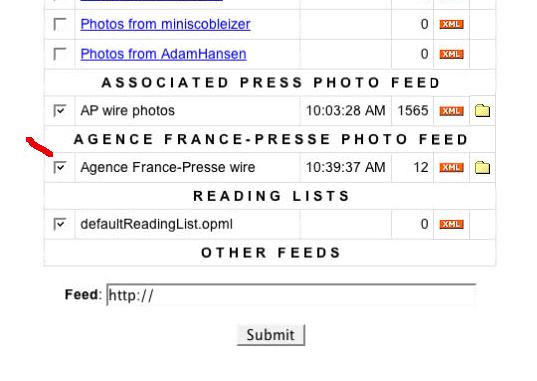
If you want to opt-out of the AFP feed, you can easily do so:1. Visit the Feeds page (click this link on the machine running FlickrFan).
2. Scroll down to the bottom of the page where you'll see a checkbox for the Agence France-Presse feed. (Screen shot.)
3. Uncheck the box, and click on Submit.
You can go into the Finder and delete the folder in the screenSaverPics folder.
Getting the full version
I'm going to do a new build of the full app after I'm sure this update goes through without glitches. Check back here later today for a pointer.Change #029. New features and fixes in 0.45
1. New page on the desktop website that allows you to subscribe to a feed provided as an argument in the web address. Makes it easy for me to publish a link that with one click will subscribe users to a feed.
2. Updated the Feeds page so that the Agence France-Presse feed has equal billing with the AP feed. Also expanded "AP" to "Associated Press."
3. Thanks to Matt Mullenweg, Automattic and Wordpress.com for generously hosting the Agence France-Presse photos. There are lots of them (you'll see, it's quite a flow) and they're big). My bandwidth expense would have been huge without their help, which is much appreciated.
4. In photoFanSuite.background.everyNight, remove all image tables created more than a week ago whose files have been deleted.
5. We pass through the pubDate from the RSS feed, if provided, in the creation and modified dates of the image files. photoFanSuite.parseXstruct, photoFanSuite.downloadImage.
Change #028. Roll the clock back on updates
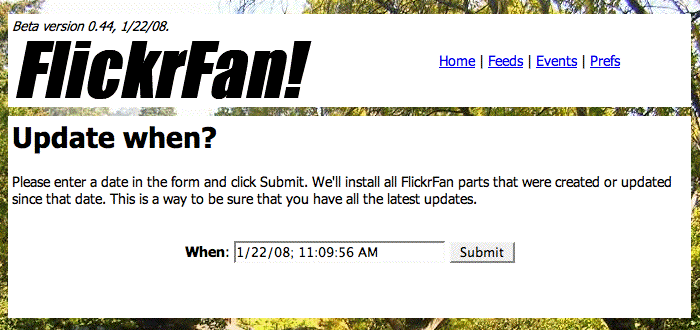
A new page lets you set the date for updating. Screen shot.
We install all new or updated parts since that date.
This page is added primarily for support, when it seems as if a user is missing some updates, it gives us a way to get them fully updated, for sure.
Click here to get all updates released since Dec 1, 2007.
Change #027. RSS feed for changes
There's a new RSS feed for changes recorded on this site.
Change #026. New features for the Events page in v0.43
There are two new links on the Events page, Previous and Next, which move you back and forward in time.
When you click on the Events link on each page you're looking at the events for today (pictures downloaded, code updates, Flickr backups, etc). When you click on the Previous link you see yesterday's events, click on Next to move forward in time. Screen shot.
In the upper-left corner of the page you can see the date whose events are being displayed.
The links and date display are repeated at the bottom of the page.
If you don't have version 0.43, you can update manually by clicking this link.
PS: If it works and you like it, feel free to post a note here or send an email. It helps to know when it's not working and when it is working. :-)
Change #025. If your FlickrFan stopped updating
There have been reports of problems with FlickrFan installations not updating, or cryptic error messages showing up when refreshing the desktop website.
All the problems that have been reported so far can be cured by clicking on the link below:
http://127.0.0.1:5337/photofan/updateNow
After updating, refresh the home page. The version number, in the upper-left corner of the home page should say "Beta version 0.41."
If this does not cure the problem and you either aren't getting updates, or the desktop website isn't working, please post a comment below. I want to get everyone working as soon as possible.
Change #024. Upload defaults
This is a convenience, not earth-shaking, but nice to have...
1. Update to get the new features, version 0.39.
2. There's a new prefs page for setting Upload defaults.
3. You can set the default description, tags, access controls (public, friends, family, or hidden from Flickr's search command), content type or safety level.
These values apply to all uploads through the drop folder. Of course you can use the Flickr website to change the values for any individual picture.
Change #023. How to be absolutely sure you have the latest version
If for some reason your copy of FlickrFan isn't updating, you can always get the latest version, quickly, without losing any of your data or prefs or downloading any pictures again. (Key point.)
1. Download photoFan.root.
2. Open the OPML folder, copy it into Guest Databases/Apps/Tools.
3. Quit the OPML and relaunch.
4. Check the version number in the upper left corner of the desktop website home page. Screen shot.
Change #022. If FlickrFan is opening the wrong browser...
If your default browser is not Safari or Firefox, on startup, FlickrFan will launch one of those browsers to display the home page of the desktop website. This change note explains a feature, new in version 0.38, that makes it possible to turn off this feature.
1. Update FlickrFan to v0.38.
2. Visit the Advanced prefs page. The third item is the one you want. Screen shot.
3. Check the box, click on Submit.
Next time you launch OPML, the desktop website home page will open in the default browser, OmniWeb, Opera, Camino, etc. (Even Firefox or Safari, for that matter.)
Eventually, if everything goes well, we'll phase out the feature. Didn't want to do it all at once because it's a dangerous place for breakage. One step at a time. 
Change #021. Subscribe to a Flickr tag
New in version 0.37.
It was always possible to subscribe to a Flickr tag, if you knew the syntax for RSS feeds that do that, but this new page makes it as easy as entering a tag into a web form.
The new page is linked to from the bottom of the Feeds page. When you successfully add a Flickr tag feed it will appear near the bottom of the Feeds page, and will work like any other feed you subscribe to.
Change #020. Lots of little fixes for 0.35
1. A new page that Updates Now so users don't have to trek into the OPML Editor to cause an update to happen immediately. Screen shot.
2. Link from each Change Note to the home page of the change notes site.
3. One-time code to rebuild feeds
Change #019. Fixed major bug on Feeds page
The ability to subscribe to an arbitrary feed was added late in the pre-public-beta period, and wasn't tested thoroughly enough. If you tried to subscribe to a feed that couldn't be processed, the Feeds page would break. Many apologies to the people who reported and experienced this bug. It's been fixed.
How to manually udate
FlickrFan will automatically get the updates at the top of the hour. If you can't wait till then to try it out, you can update manually as follows:
1. Bring the OPML app to the front.
2. In the WIndow menu choose photoFan.root, bringing that file to the front.
3. From the Tools menu, choose Update front tool.
If it worked, you should see a dialog like this.
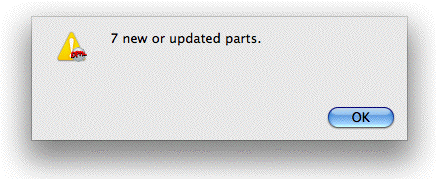
It may take a minute to fix the database so the Feeds page correctly displays.
How to tell if you got the update
Now if you subscribe to a bad feed it should give you an error message in red, and proceed without any further problems.
Also, I bumped the version to 0.34, look in the top left corner of any page on the FlickrFan local website. If it says 0.34, you have the new code.
Again apologies for this programming error.
Change #018. How to find a user's feed, if they have one
As you may know, every FlickrFan user can have a feed of pictures they want to share with others. It works much like the POST button in Radio 8 or a linkblog with Google Reader.
On the public list, there's now a white-on-orange XML icon next to every user who has a feed who hasn't opted-out.
You can set it up on the first two Prefs pages.
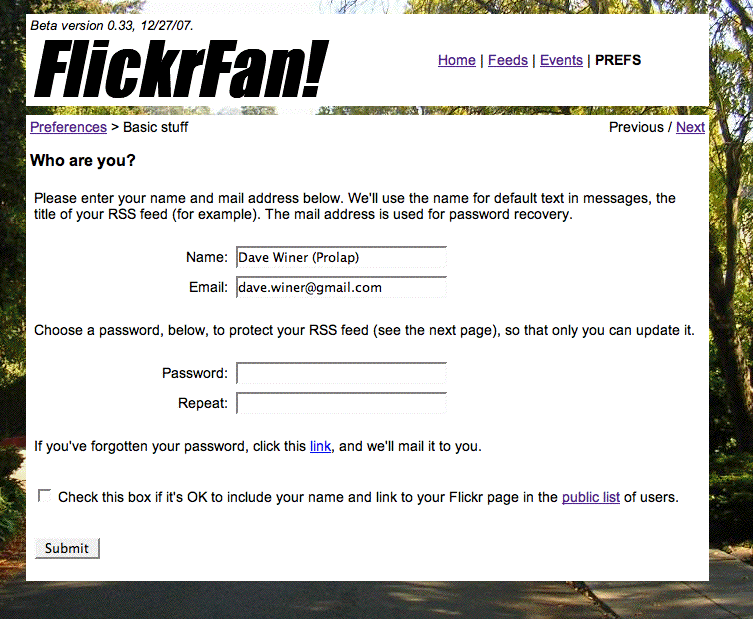
On the first page, you set the password that protects the feed so only you can write to it. You can also uncheck a box to opt-out of the public list of users. Screen shot.
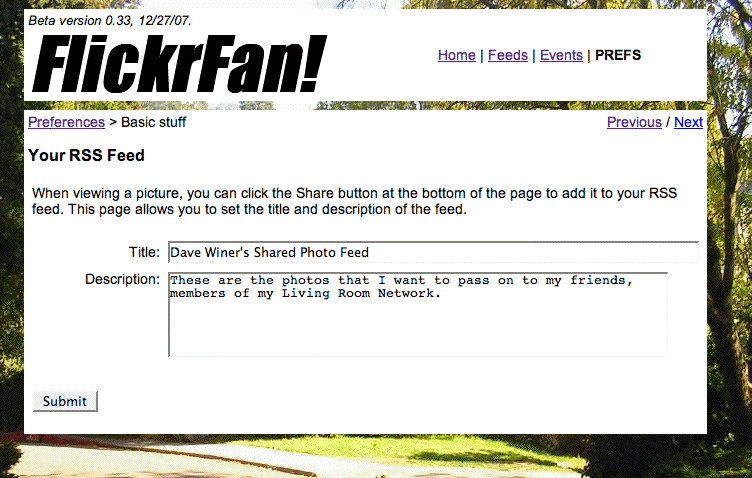
On the second page, you can set the title and description of the feed. Screen shot.
You must share one or more items in order for the feed to be generated. You can do that by browsing pictures on the Events page.
Click on the title of the picture to view it, and then click the Share button at the bottom of the Share Picture page.
So far there are only a handful of people with feeds, and most people are just trying it out, but we're still in the first 48 hours. :-)
Change #017. List of newly-installed FlickrFans
Every hour on the hour, after doing its scan of RSS feeds, FlickrFan pings the community server.
It maintains a reverse-chronologic list of newly installed copies of FlickrFan with links to the Flickr accounts of each of the users.
You can opt-out of this list on the first Prefs page.
To do so, uncheck the box at the bottom of the page then click the Submit button. At the top of the hour it will transmit this preference and your name will be removed from the list. If you change your mind and want to be on the list, just check the box and click Submit.
Change #016. Installation tips for v0.33
To install a fresh version of FlickrFan, download the disk image, drag the OPML folder into the Applications folder. Copy the whole folder, every file is important.
To get started, open the folder and double-click on the OPML application. It takes a minute the first time it runs. When it's ready it opens a page in the browser, either Firefox or Safari.
Follow the instructions on the opening page.
If you have questions, post a comment here.
I hope you like it! Dave
Change #015. Version number in the user interface
The version number and release date appear in the UI above the name of the product.
Bumped the version number to 0.32.
Change #014. Various UI, small nice-to-have features
1. Change the name in the UI from Rrromantico! to FlickrFan. The name is totally parameterized so it is easy to change again.
2. When you subscribe to new feeds on the Feeds page immediately read them instead of waiting until the top of the hour. It seems silly for the app to just sit there waiting.
3. When new parts are received through updates, log them on the Events page.
Change #013. Add comments to change notes using Disqus
I want to give users a way to ask questions about new features as they come online, so I added the ability to comment on each item.
Turns out to be a fairly complicated change because there must now be a page for each individual change.
Change #012. Flickr drop folder
If enabled, we create a folder on the desktop called Flickr. Any pictures you drop in that folder are automatically posted to Flickr. You must authorize the OPML Editor app to upload to your Flickr account, a link is provided on the prefs page
Change #011. Advanced prefs page
A new page allows you to set the maximum concurrent downloads and the smallest picture size, and perhaps other things later.
Change #010. Archiving pictures
You can set a limit of the number of pictures in the screen saver folder, when that limit is reached, we automatically delete or archive the oldest pictures first. By default the feature is enabled and it deletes pictures it doesn't save them. The default limit is 5000 pictures.
Change #009. Backing up your Flickr pictures
A new set of prefs controls the backing up of the pictures stored on flickr.com. You must authorize the OPML Editor to read and write your Flickr account (this is necessary to download the original pictures, otherwise we can only download smaller versions, it's also necessar for uploading pictures). The first prefs page for backup has this link. The second page allows you to schedule an incremental backup every evening, we only download the new pictures since the last time we backed up. You can also specify the start hour.
Change #008. Sharing pictures
Thanks to Scoble for driving this. Now there's a Share This Picture button at the bottom of the Picture Viewer page. Press the button and a form pops up with a place for a title and description, pre-populated with the title and description that the original photographer provided. You can edit either, then click the Share button, and it is added to your RSS feed. The form is displayed again, but this time the Share button says Update, so you can continue to edit as long as you want.
There's a new Prefs page that allows you to set the title and description of your feed, and choose a password so that no one else can upload your feed (lightweight blog-style security). There's an option to have your password mailed to you. (To do: find a mail server to relay through.)
Change #007. Port the prefs system from FlickrFan
There are lots of options users need to be able to set that go beyond setup, that's what the browser-based prefs system is for.
Change #006. Revamp picture viewing in the browser
The random page had most of the code I wanted. Instead of linking from the Event Log directly to the picture, we're linking to a new page that displays the picture. Example. This gives us a place to implement the collaborative features I've been talking about with Scoble.
The starting point is the Events page, that's where you see the pictures as they came in, it's like a blog or the feed in Facebook or the Home page in Twitter. Every event is listed there.
Change #005. New look and organization for the desktop website
The menus behave as they should, with the current page highlighted. The graphic at the top of the page is gone. There's a background picture, which the user will be able to set (eventually). I played around with product names, and found one that makes me laugh. So wtf, I put it at the top of the screen, along with the menu of pages. It's all still rough, but getting less so and more functional.
Change #004. Pinging
Every copy of photoFan pings back to a central server every hour at the top of the hour, telling us what feeds it's subscribed to, how many times each feed has been checked, how many pictures have been downloaded from each feed.
This data will be used to form an aggregate picture of the picture feed ecosystem.
We will also use this facility in the future for community features, as yet undetermined. :-)
The ping call appears in the log.
Change #003. New change notes reporting system
I have a new editorial system for creating and editing change notes, not just for photoFan.root but for all OPML Editor based apps. The notes are published in HTML and in OPML. Clearly they should also be published in RSS (but not today, I'm rushed to get out of town).
Change #002. Synching contacts
Your contacts now are kept in synch with the contacts from flickr.com. When you make a change, either removing someone or adding someone, that will be reflected within 5 minutes on your Feeds page, usually more quickly. (This is a function of how frequently we check.)
Change #001. Better logging of picture downloads
The Log page now includes descriptive information about each picture as it is being downloaded.